问题标题
tooltip是否支持自定义双行显示内容?
问题描述
请问一下vchart 的饼图,tooltip是否支持自定义双行显示内容?目前看vchart的文档是可以设置tooltip的title和content,但是好像是仅支持展示饼图其中一块的内容,而且在小程序中这块好像并不支持?是需要监听回调?
解决方案
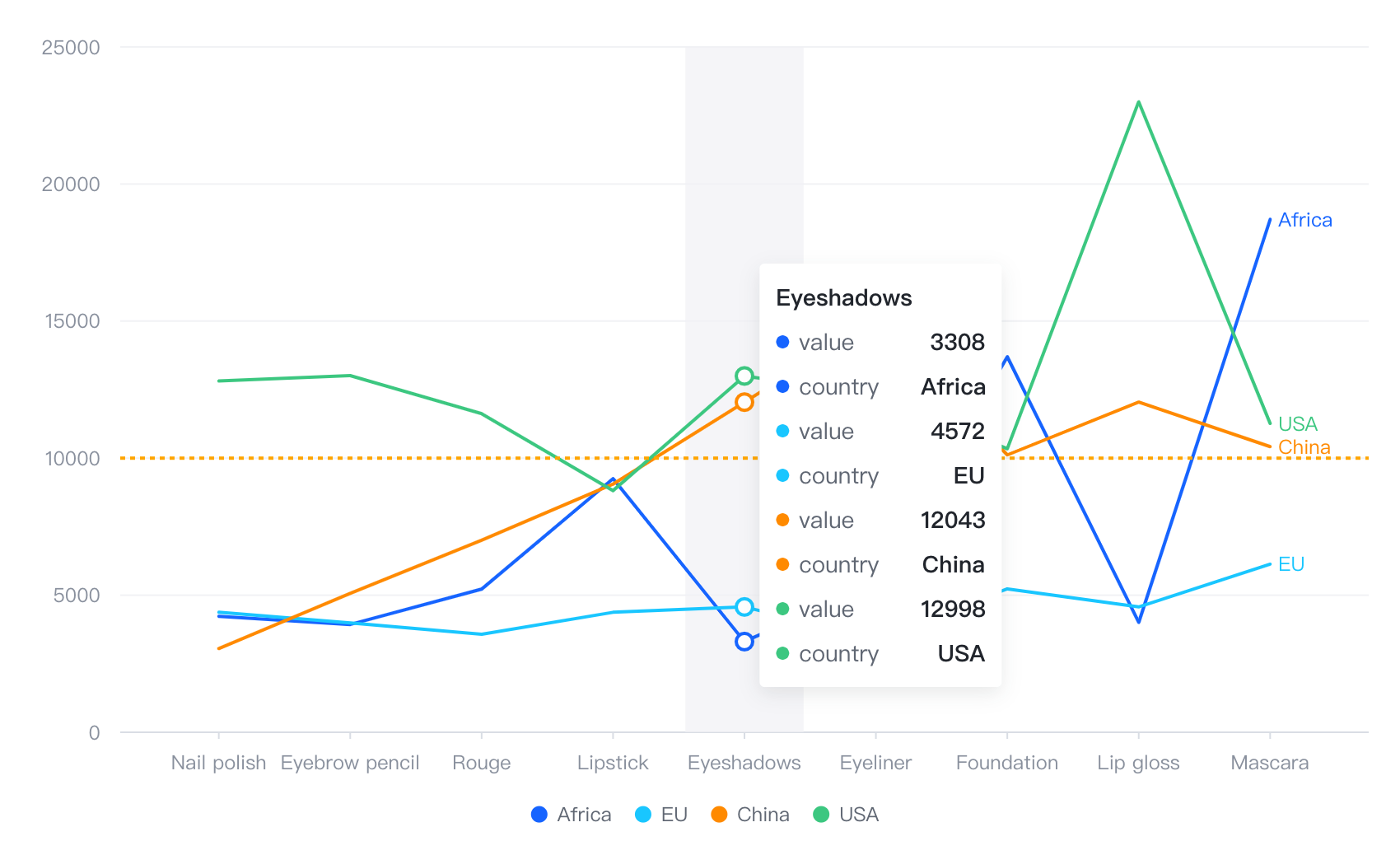
VChart Tooltip 可以配置多个 content 内容来展示更多的提示信息:
  tooltip: {
    dimension: {
      content: [
        {
          key: 'value',
          value: (datum) => datum.value,
        },
        {
          key: 'country',
          value: (datum) => datum.country,
        }
      ],
    }
  }</br>
代码示例
const markLineValue = 10000;
const spec = {
  type: 'line',
  data: {
    values: [
      { type: 'Nail polish', country: 'Africa', value: 4229 },
      { type: 'Nail polish', country: 'EU', value: 4376 },
      { type: 'Nail polish', country: 'China', value: 3054 },
      { type: 'Nail polish', country: 'USA', value: 12814 },
      { type: 'Eyebrow pencil', country: 'Africa', value: 3932 },
      { type: 'Eyebrow pencil', country: 'EU', value: 3987 },
      { type: 'Eyebrow pencil', country: 'China', value: 5067 },
      { type: 'Eyebrow pencil', country: 'USA', value: 13012 },
      { type: 'Rouge', country: 'Africa', value: 5221 },
      { type: 'Rouge', country: 'EU', value: 3574 },
      { type: 'Rouge', country: 'China', value: 7004 },
      { type: 'Rouge', country: 'USA', value: 11624 },
      { type: 'Lipstick', country: 'Africa', value: 9256 },
      { type: 'Lipstick', country: 'EU', value: 4376 },
      { type: 'Lipstick', country: 'China', value: 9054 },
      { type: 'Lipstick', country: 'USA', value: 8814 },
      { type: 'Eyeshadows', country: 'Africa', value: 3308 },
      { type: 'Eyeshadows', country: 'EU', value: 4572 },
      { type: 'Eyeshadows', country: 'China', value: 12043 },
      { type: 'Eyeshadows', country: 'USA', value: 12998 },
      { type: 'Eyeliner', country: 'Africa', value: 5432 },
      { type: 'Eyeliner', country: 'EU', value: 3417 },
      { type: 'Eyeliner', country: 'China', value: 15067 },
      { type: 'Eyeliner', country: 'USA', value: 12321 },
      { type: 'Foundation', country: 'Africa', value: 13701 },
      { type: 'Foundation', country: 'EU', value: 5231 },
      { type: 'Foundation', country: 'China', value: 10119 },
      { type: 'Foundation', country: 'USA', value: 10342 },
      { type: 'Lip gloss', country: 'Africa', value: 4008 },
      { type: 'Lip gloss', country: 'EU', value: 4572 },
      { type: 'Lip gloss', country: 'China', value: 12043 },
      { type: 'Lip gloss', country: 'USA', value: 22998 },
      { type: 'Mascara', country: 'Africa', value: 18712 },
      { type: 'Mascara', country: 'EU', value: 6134 },
      { type: 'Mascara', country: 'China', value: 10419 },
      { type: 'Mascara', country: 'USA', value: 11261 }
    ]
  },
  stack: false,
  xField: 'type',
  yField: 'value',
  seriesField: 'country',
  lineLabel: { visible: true },
  legends: [{ visible: true, position: 'middle', orient: 'bottom' }],
  point: {
    style: {
      opacity: 0
    },
    state: {
      dimension_hover: {
        opacity: 1,
        size: 10,
        lineWidth: 2,
        stroke: {
          scale: 'color',
          field: 'country'
        },
        fill: 'white'
      }
    }
  },
  markLine: [
    {
      y: markLineValue,
      endSymbol: {
        visible: false
      },
      line: {
        style: {
          stroke: 'orange',
          lineWidth: 2
        }
      }
    }
  ],
  tooltip: {
    dimension: {
      content: [
        {
          key: 'value',
          value: (datum) => datum.value,
        },
        {
          key: 'country',
          value: (datum) => datum.country,
        }
      ],
    }
  }
};

const vchart = new VChart(spec, { dom: CONTAINER_ID });
vchart.renderSync();

// Just for the convenience of console debugging, DO NOT COPY!
window['vchart'] = vchart;</br>
结果展示